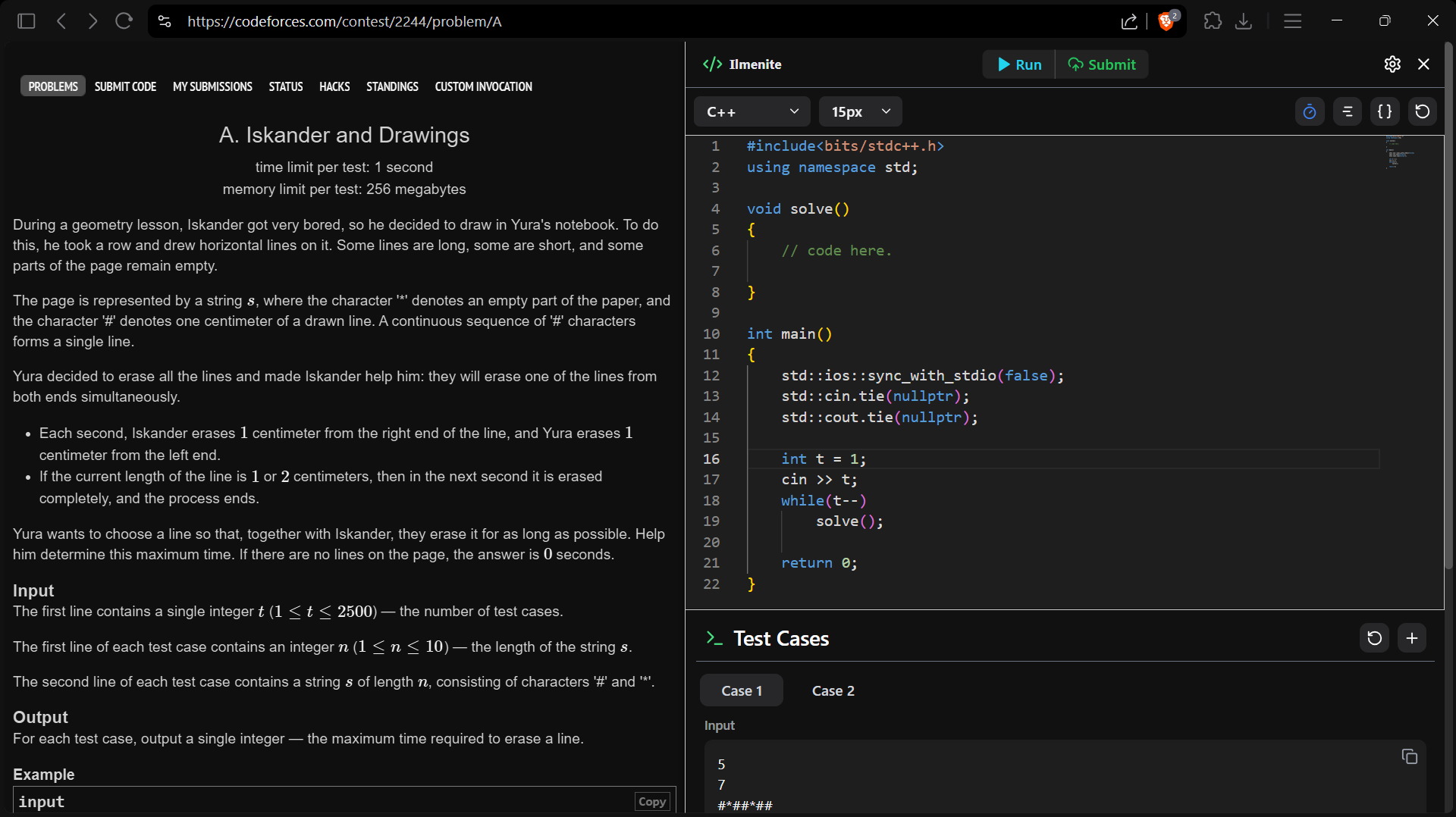
The Modern Codeforces Companion • Fast & Seamless

Unlock Your True Potential on Codeforces.

Elevate your competitive programming workflow. Enjoy Monaco editor with VIM mode, custom testcase execution, word-based auto suggestions, and upgrade to Ilmenite Plus for effortless real-time multi-device cloud synchronization.
Cancel anytime • 100% contest legal • Instant activation
Cloud Sync Active
Monaco & VIM Mode
5/5 Custom Testcases
Word-Based Auto Suggestions
1-Click Code Formatter
Eye Comfort Amber Shield
Ilmenite Codeforces Extension in Live Action
10,000+ Problems Solved with Ilmenite
C++ • Py • Java Multi-Language Ready
1-Click Run & Submit Shortcuts
5.0 Chrome Store Rating

Engineered for Competitive Dominance

Every millisecond counts on the leaderboard. Ilmenite gives you the seamless competitive edge.

Advanced Appearance & Eye Comfort

Take full control of your viewing experience. Fine-tune brightness, dial in high-contrast mode, and enable the amber eye comfort shield for intense late-night contest rounds.
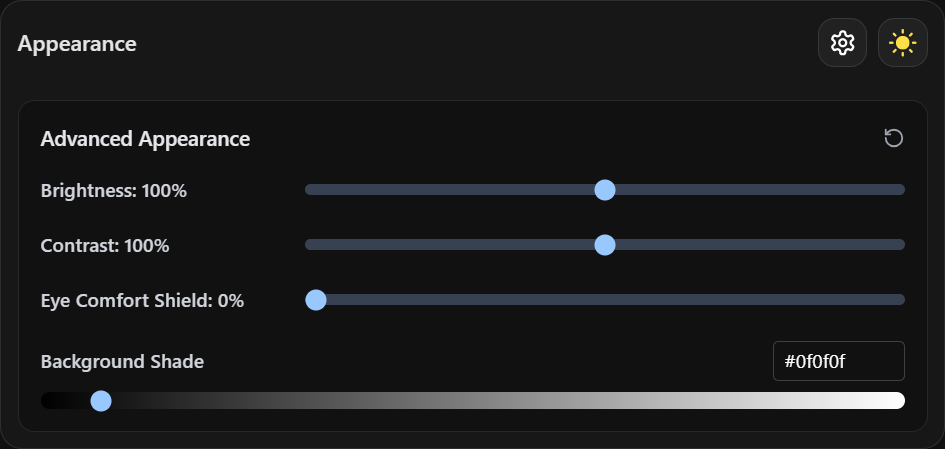
  • Multi-level background shade adjustment
  • Blue-light filter eye protection shield
  • Real-time preview with zero reload latency
Advanced Appearance Settings

Instant Code Snippets Hub

Stop rewriting standard algorithms. Store and instantly insert Segment Trees, DSU, Modular Arithmetic, and Fast I/O directly into Monaco with a single keystroke.

  • Custom prefix trigger autocomplete
  • Unlimited snippet storage (sync to cloud with Plus)
  • Multi-language support (C++, Python, Java)

Modernized Codeforces Experience

Modernize the classic Codeforces platform. Enjoy a sleek injected dark mode, cleaner typography, distraction-free reading, and a side-by-side resizable editor panel.

  • Native Codeforces Dark Mode & Clean Theme
  • Distraction-free problem statement formatting
  • Modernized problemset table with tag & rating filters
Enhanced UI Customization

Word-Based Auto Suggestions

Code faster with zero typos. Monaco-powered word suggestions automatically remember and complete previously typed variables, function identifiers, and keywords inside your current editor session.

  • Instant completion for typed variables & identifiers
  • Prevents syntax typos under contest time pressure
  • Lightweight, fast, and completely lag-free

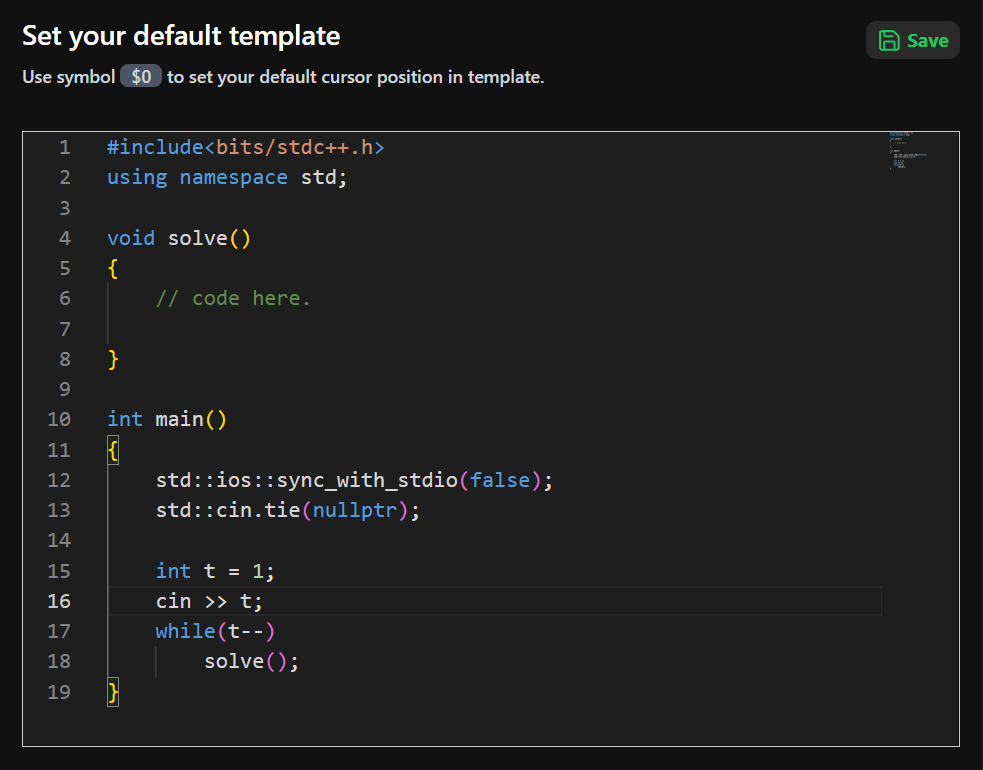
Custom Boilerplate Starter Templates

Never start with an empty editor again. Configure your starter templates with Fast I/O and custom headers that automatically load the second you open any Codeforces problem.

  • Auto-detect problem ID & title headers
  • Multi-language template switching
  • Automatic cursor placement inside solve() function
Starter Templates

Built for Serious Competitors

Tools crafted to save you valuable contest minutes and keep your workflow synchronized across devices.

Unlimited Multi-Device Cloud Save (Plus )

Save unlimited solutions directly to your secure cloud database. Switch from your desktop to your laptop mid-contest with automatic code fetch, cross-device template roaming, and zero loss of custom settings.

Instant Code & Settings Roaming Zero Data Loss on Cache Clear Cloud Snippets & Templates Hub
GitHub Auth • Supabase Cloud Sync: Real-Time Active

Custom Keyboard Shortcuts

Keep your hands glued to the keyboard with customizable hotkeys for every frequent action.

Ctrl + ' ➔ Run Code
Ctrl + Enter ➔ Submit Code
and many more (Reset, Format)...

Up to 5 Custom Test Cases

Add and batch-run up to 5 custom testcases side-by-side with execution time (ms) and memory metrics.

TC #1 PASSED (12ms) TC #2 PASSED (8ms) TC #3 PASSED (15ms)

Intelligent Code Formatter

Clean up messy contest code with a single shortcut. Built-in automatic indentation and syntax beautifier.

Auto Indent & Clean

Editor Options & VIM Mode

VIM / Standard keybindings, minimap toggle, smooth cursor animation, and custom themes.

Free vs. Ilmenite Plus

Full local features on Free. Seamless multi-device cloud synchronization with Plus.

Feature Capability Free Tier Ilmenite Plus
Monaco Code Editor & VIM Bindings Full Access Full Access
Custom Testcases Runner Up to 5 Testcases Up to 5 Testcases
Custom Code Snippets Hub Saved Locally Synced to Cloud
Boilerplate Starter Templates Saved Locally Synced to Cloud
Problem Code Storage Saved Locally Unlimited Cloud Backup
Settings & Appearance Preferences Saved Locally Synced Across Devices
Advanced Eye Shield & Dark Mode Full Access Full Access
Custom Keyboard Shortcuts Full Access Full Access
Intelligent Code Formatter Full Access Full Access
Multi-Device Seamless Roaming Included
Priority Support & Early Updates VIP Priority

Frequently Asked Questions

Got questions? We've got answers.

Is using Ilmenite allowed during official Codeforces rounds?
Yes, 100%! Ilmenite operates strictly on the client side as a UI and editor productivity enhancement. It uses standard web requests to interact with Codeforces and adheres completely to contest rules.
How does cloud synchronization and authentication work?
Ilmenite exclusively uses secure GitHub authentication powered by Supabase. Once logged in, your saved problem solutions, custom templates, snippets, and preferences are automatically synced in real time across all browsers and computers where you use the extension.
What payment methods are supported for Plus?
We support all major payment methods through Razorpay, including UPI (Google Pay, PhonePe, Paytm, BHIM), Credit Cards, Debit Cards, NetBanking, and Wallets.
Can I cancel my Plus subscription anytime?
Yes, you can cancel your subscription at any point with a single click. You will retain all Plus benefits until the end of your billing period with zero cancellation fees.
Do I need an account to use the free version?
Yes. As soon as you install the Ilmenite extension, you simply log in with your GitHub account to initialize your workspace. You can then immediately start coding with all free features.
MOST POPULAR • BEST VALUE

Join the Plus Tier

Supercharge your competitive programming workflow with seamless cloud sync for less than a cup of chai per day.

₹99 ₹ 33 /month
67% Limited Launch Discount Applied
  • Unlimited Multi-Device Cloud Code Save & Auto-Fetch
  • Cloud Starter Templates Sync & Auto-Load
  • Cloud Custom Algorithm Snippets Hub Sync
  • Cloud Editor Settings & Appearance Preferences Sync
  • Zero Data Loss on Browser Cache Clear or Computer Switch
  • VIP Priority Support & Beta Feature Access

Secure 256-bit encrypted checkout via Razorpay • Cancel anytime with 1 click